
Import a .qbo statement
Import QuickBooks Web Connect rows into the Bank Transactions review queue.
The Help Center button in the Import Transactions dialog opens this guide in a new browser tab.
Supported format
xBoox supports .qbo only for normal bank and credit-card statement import.
PDF, .ofx, CSV, XLS, and XLSX are not supported normal statement formats. The retiring Historical QuickBooks Migration Tool is unrelated to this workflow.
Download a .qbo file from your bank
Many online banking portals offer a transaction-download or export page, but the menu names and available formats vary by bank. Look for a format named Intuit QuickBooks, QuickBooks Web Connect, or .qbo. Do not select PDF, CSV, XLS, XLSX, or .ofx for this xBoox workflow.
CIBC example
The following screenshot is an example from CIBC's Download Transactions page. It is not an xBoox screen.
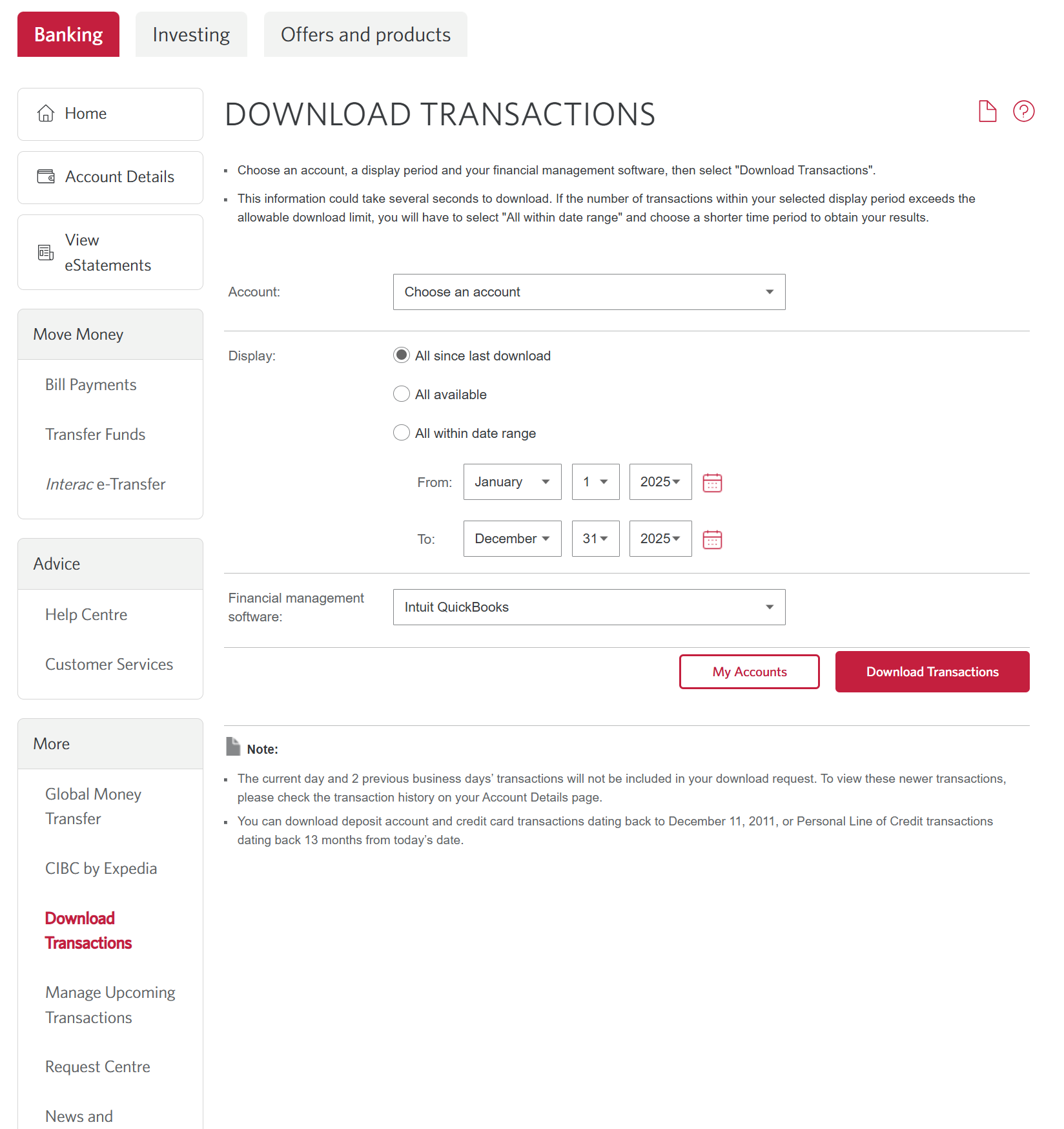
- In CIBC online banking, open Download Transactions.
- Select the bank or credit-card Account.
- Choose the transaction range. Use All within date range when you need a
specific statement period.
- Under Financial management software, select Intuit QuickBooks.
- Select Download Transactions, then save the downloaded
.qbofile.
If your bank does not offer a QuickBooks or .qbo download option, it cannot currently provide a file for xBoox's normal statement-import workflow. Contact the bank for its supported QuickBooks/Web Connect export options.
Steps
- Open Banking.
- Select the xBoox bank or credit-card account represented by the file.
- Select Import Transactions. The selected account appears in the dialog.
- Select the
.qbofile. - Review the account and file information.
- Select Import Transactions. xBoox checks duplicates and available source-account information before saving.
- If all rows are new and no account warning is found, import continues automatically. Otherwise, review the explanation in the same dialog before continuing.
Review before saving
- Some transactions already exist: the dialog shows new and duplicate counts. For example, 20 new · 80 duplicates offers Import 20 New Transactions. Only new rows are saved; duplicate rows are skipped.
- These transactions already exist: no import is performed and no Statement is created. Choose Choose Another File or Done.
- Check the destination account: the file or source account may have appeared under another xBoox account, may differ from previous imports, or may have a bank/credit-card type that differs from the selected account. Import Anyway continues if the destination is intentional. To change the destination, close the dialog and select the correct account in Bank Transactions.
- If a file contains multiple source accounts, a warning explains that continuing places all rows into the single selected destination. Prefer separate exports for each account.
Warnings are advisory and depend on the identifiers available in the file and earlier imports. Absence of a warning does not establish that the destination is correct. The preflight does not save a Statement or bank rows. Final saving checks duplicates again, so the completion counts can differ if another import saves matching rows after the check.
xBoox stores the imported file as a Statement record and creates raw Bank Transactions. Imported rows begin in the Pending review queue; importing does not automatically create Expenses, Income, or Transfers.
The .qbo file must declare its currency with CURDEF, and that currency must match the Workspace currency. xBoox does not guess a missing currency. xBoox does not convert statement amounts during import. For example, a USD file is rejected for a CAD Workspace rather than saving the USD numbers as CAD. Large files are saved in smaller batches, but all batches from one import are kept under one Statement archive record.
Dates and duplicate protection
The .qbo DTPOSTED value is treated as the bank posted date. It may differ from the purchase or receipt date.
Structured bank transaction identifiers are retained for duplicate protection. Use the same xBoox account that the file represents. Duplicate protection uses the structured FITID within the same Workspace and account, including active Pending, Posted, and Ignored rows. Posting a row does not remove its duplicate protection. Identical rows within the selected file also contribute to the duplicate count. Rows imported into a different xBoox account are not automatically skipped; account warnings help you review that destination without blocking an intentional import. Every transaction row must include the .qbo file's structured FITID identifier. xBoox rejects the file before saving a Statement or any Bank Transactions if a row has no FITID, because that row cannot be imported safely without reliable duplicate protection. The complete file is also rejected before any rows are saved if a transaction has an invalid or missing posted date or amount. Dates must be real calendar dates, so a value such as February 30 is rejected. An incomplete transaction block is also rejected instead of being silently omitted. xBoox identifies the first affected row before upload.
If an import is interrupted, select the same file and account again. xBoox recognizes the file and resumes the same Statement record instead of creating another archive. Rows already saved remain protected from duplication. If a later batch fails after an earlier batch was saved, the error identifies how many rows were already imported and directs you to retry the same file. Renaming that same file does not create a second Statement. If you delete its Statement archive and later import the same file again, xBoox creates a new active Statement while retaining the deleted record in audit history.
After import
- Open Pending to review and classify new rows.
- Open Statements to review the imported statement archive.
- Do not reconcile until the applicable rows are classified, matched, ignored, or otherwise reviewed.
Troubleshooting
The file is rejected
Confirm that its filename ends in .qbo and that it is a valid QuickBooks Web Connect file. Also confirm that the file declares a currency matching the Workspace currency and that every transaction row contains a FITID.
The account is not available
The account must belong to this Workspace, be active, have Bank & Cash or Credit Card type, and have Use for statement import and reconciliation enabled. Cash on Hand and the built-in Personal Credit Card are not supported statement accounts. Account names and numbers do not determine eligibility.